TIS_Edge (Quantower)
$300.00
Entradas de pullback a favor de la tendencia para Quantower. Donchian y EMA definen la fase del mercado; filtros de vela y repetición controlan las señales.
Trend-following pullback entries for Quantower. Donchian and EMA define the market phase; bar and repeat filters control how many signals you take.
Descripción
Indicador para Quantower
TIS_Edge
Detecta entradas de pullback dentro de tendencias ya establecidas. Combina un canal de Donchian con una EMA para definir de forma objetiva la fase del mercado, y marca la señal cuando el precio retrocede hasta la EMA a favor de la tendencia.
Cómo funciona
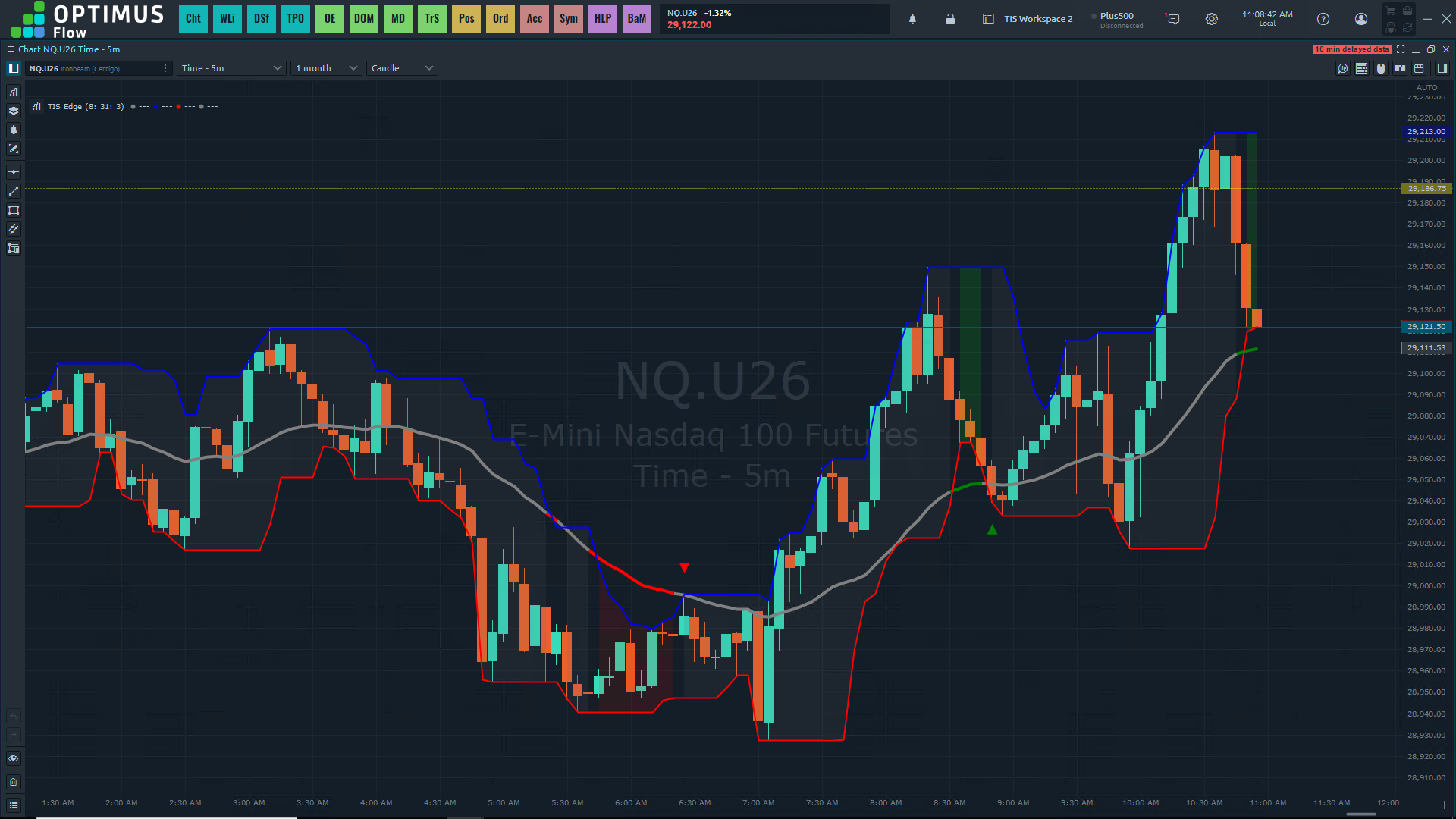
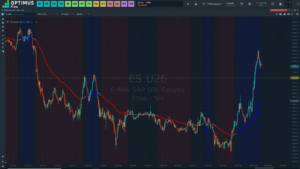
La posición de la EMA respecto del canal de Donchian define tres fases de mercado: tendencia alcista fuerte, tendencia bajista fuerte o neutral. La EMA se colorea según la fase y un sombreado de fondo opcional entre las bandas deja ver el estado actual de un vistazo. Mientras el mercado esté en fase neutral no hay señales: el indicador espera a que la tendencia esté definida.
Con la tendencia establecida, TIS_Edge espera el retroceso hacia la EMA. Hay dos modos de setup: Clásico marca en el momento en que el precio toca la línea, para agarrar la continuación temprano. Avanzado espera a que el precio se aleje otra vez, confirmando el rebote antes de dar la señal. Podés usar cualquiera de los dos, o los dos a la vez.
Sobre eso se apilan dos filtros. El filtro de vela exige que la vela de señal acompañe la dirección: por color, por cierre respecto del punto de entrada, o por ambas condiciones. El filtro de repetición controla cuántas señales se toman por acercamiento: una sola por aproximación a la línea, una por lado, o ambas reglas juntas. Es lo que evita acumular entradas en un lateral que roza la EMA una y otra vez.
Características principales
▪ Definición objetiva de tendencia combinando EMA y canal de Donchian
▪ Tres fases de mercado con EMA coloreada y sombreado de fondo opcional
▪ Señales de pullback solo a favor de la tendencia, nunca en fase neutral
▪ Modo Clásico por toque y modo Avanzado por recuperación, utilizables en conjunto
▪ Filtro de vela por color, por cierre o por ambos
▪ Filtro de repetición para una operación por acercamiento o por lado
▪ Bandas de Donchian y EMA activables de forma individual
▪ Desarrollado para Quantower, no adaptado desde una solución genérica
Parámetros
| Parámetro | Descripción |
|---|---|
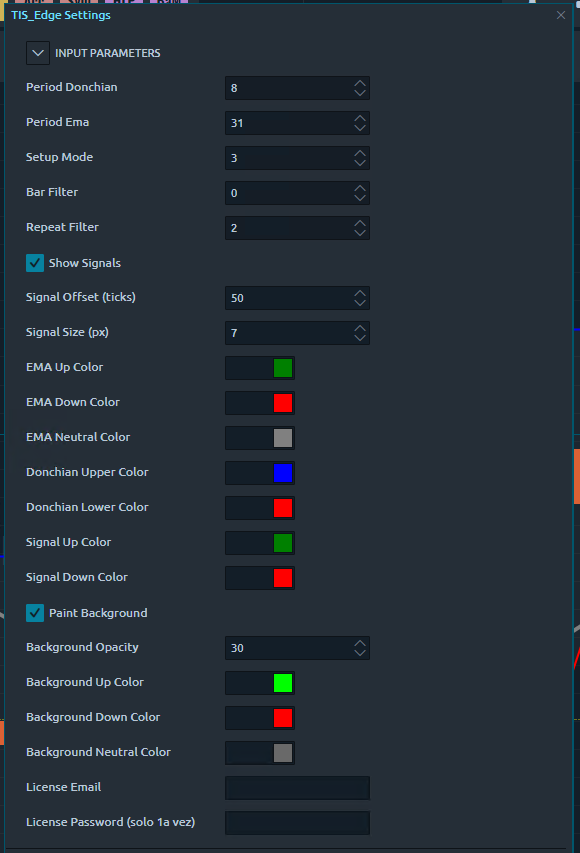
| Donchian Period | Período de análisis del canal de Donchian que define la fase del mercado. |
| EMA Period | Período de la EMA usada como línea de referencia del pullback. |
| Setup Mode | 1 = Clásico (toque), 2 = Avanzado (recuperación), 3 = Ambos. |
| Bar Filter | Confirmación de vela: 0 = ninguna, 1 = color a favor, 2 = cierre a favor, 3 = ambos. |
| Repeat Filter | Repetición de señal: 0 = ninguna, 1 = una operación por lado, 2 = una operación por ciclo, 3 = ambos. |
| Signals Offset | Distancia, en ticks, entre las bandas y las marcas de señal. |
| Show Signals / Signal Colors | Activa las marcas de señal y permite personalizar sus colores. |
| Show Background / Background Colors | Activa el sombreado de fase y define los colores alcista, neutral y bajista. |
| Show Ema / Show Don | Activa la EMA y las bandas de Donchian de forma individual. |
¿Para quién es?
TIS_Edge es para el trader que compra retrocesos en tendencias alcistas y vende rebotes en tendencias bajistas, y que quiere una definición objetiva de cuándo hay tendencia y cuándo no. Los filtros de vela y de repetición permiten pasar de un setup agresivo, que toma cada toque, a uno selectivo que exige confirmación y limita las entradas por movimiento.
La plataforma va por separado
The Indicator Store provee el indicador. La licencia de Quantower, el broker, los datos de mercado y la conexión de ejecución se contratan aparte con el proveedor que elijas.
Compatible con Quantower. Incluye guía de instalación paso a paso y soporte de The Indicator Store.
Quantower indicator
TIS_Edge
Detects pullback entries inside established trends. It combines a Donchian channel with an EMA to define the market phase objectively, and marks the signal when price pulls back to the EMA in the direction of the trend.
How It Works
The position of the EMA relative to the Donchian channel defines three market phases: strong up trend, strong down trend, or neutral. The EMA is colored by phase and an optional background shading between the bands shows the current state at a glance. While the market sits in the neutral phase there are no signals: the indicator waits until the trend is defined.
Once the trend is established, TIS_Edge waits for the pullback to the EMA. There are two setup modes: Classic marks the moment price touches the line, to catch the continuation early. Advanced waits for price to move away again, confirming the bounce before signaling. You can run either one, or both at once.
Two filters stack on top of that. The bar filter requires the signal bar to agree with the direction: by color, by close relative to the entry point, or by both conditions. The repeat filter controls how many signals are taken per approach: one per approach to the line, one per side, or both rules together. That is what stops entries from piling up in a range that keeps brushing the EMA.
Key Features
▪ Objective trend definition combining EMA and Donchian channel
▪ Three market phases with a phase-colored EMA and optional background shading
▪ Pullback signals only with the trend, never in the neutral phase
▪ Classic touch mode and Advanced recovery mode, usable together
▪ Bar filter by color, by close, or by both
▪ Repeat filter for one trade per approach or per side
▪ Donchian bands and EMA can be toggled individually
▪ Developed for Quantower, not adapted from a generic solution
Parameters
| Parameter | Description |
|---|---|
| Donchian Period | Lookback of the Donchian channel that defines the market phase. |
| EMA Period | Period of the EMA used as the pullback reference line. |
| Setup Mode | 1 = Classic (touch), 2 = Advanced (recovery), 3 = Both. |
| Bar Filter | Candle confirmation: 0 = none, 1 = color in agreement, 2 = close in agreement, 3 = both. |
| Repeat Filter | Signal repetition: 0 = none, 1 = one trade per side, 2 = one trade per cycle, 3 = both. |
| Signals Offset | Distance, in ticks, between the bands and the signal marks. |
| Show Signals / Signal Colors | Toggles the signal marks and customizes their colors. |
| Show Background / Background Colors | Toggles the phase shading and sets the up, neutral, and down colors. |
| Show Ema / Show Don | Toggles the EMA and the Donchian bands individually. |
Who Is It For?
TIS_Edge is for the trader who buys pullbacks in up trends and sells rallies in down trends, and wants an objective definition of when a trend is in place and when it is not. The bar and repeat filters let you move from an aggressive setup that takes every touch to a selective one that demands confirmation and caps the entries per move.
The platform is separate
The Indicator Store provides the indicator. Quantower licensing, brokerage, market data and the execution connection are contracted separately with the provider you choose.
Compatible with Quantower. Includes a step-by-step installation guide and support from The Indicator Store.
Solo los clientes que hayan comprado este producto pueden dejar una opinión.


Opiniones
Aún no hay opiniones.