

Markers Pro – 1 License
$900.00
Conjunto de indicadores para NinjaTrader 8: definí tu lógica, vela dibujada en el gráfico, filtrala y automatizala. Sin programar. Licencia para una computadora.
A set of indicators for NinjaTrader 8: build your logic, see it on the chart, filter it and automate it. No coding. License for one computer.
Description
No es un automatizador. Es un sistema para construir el tuyo.
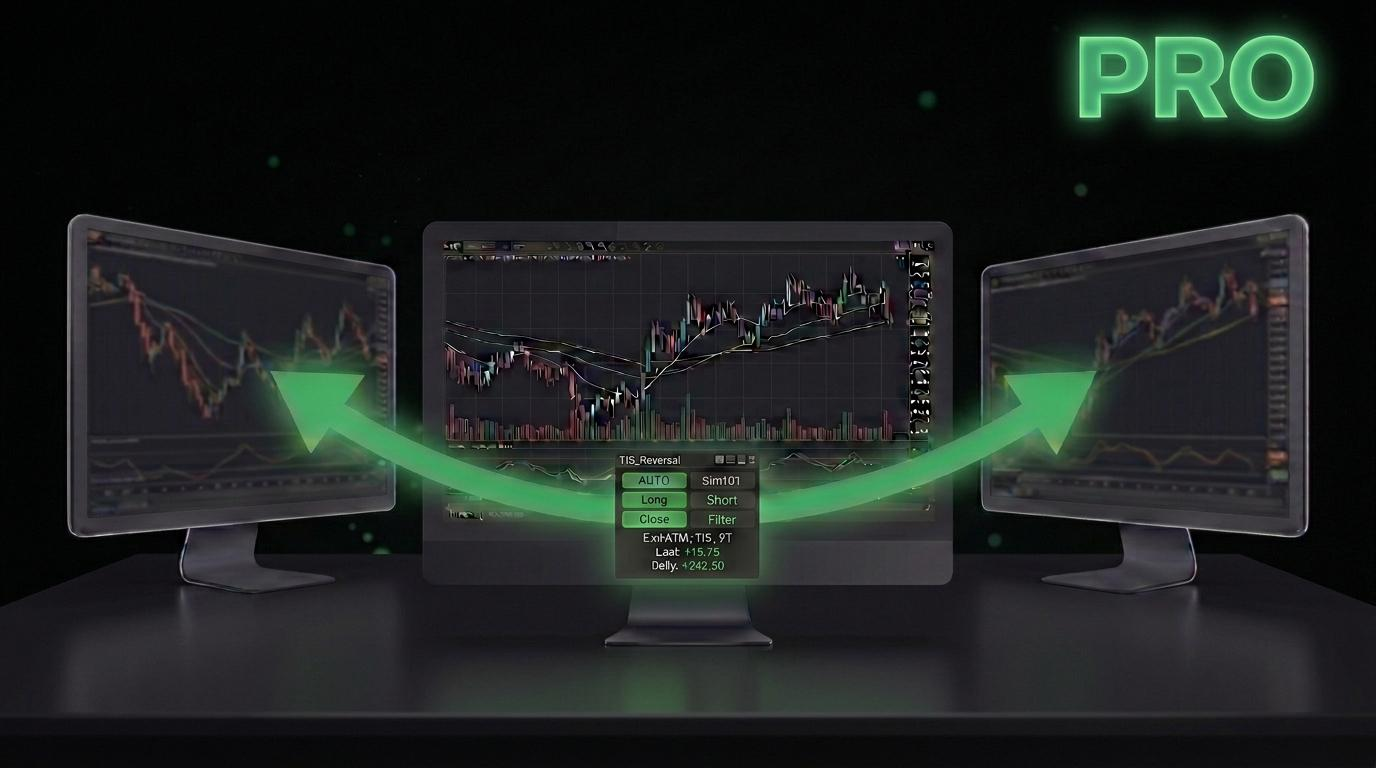
Markers Pro es un conjunto de indicadores para NinjaTrader 8 que te permite definir una lógica de trading, verla dibujada en el gráfico, filtrarla y ejecutarla automáticamente — sin escribir una línea de C#.
La diferencia con un simple ejecutor de señales es el motor de expresiones: cualquier indicador de NinjaTrader, propio o de terceros, se convierte en una variable que podés combinar, comparar y filtrar. Si aparece en el gráfico, se puede automatizar.
Cómo funciona
1 · COPIAR
Markers Copy toma el plot de cualquier indicador y lo convierte en una variable con historia, o en una señal de ejecución inmediata.
▼
2 · DEFINIR
Markers Logic combina esas variables con operadores lógicos y aritméticos, sostiene el resultado durante N velas y lo dibuja en el gráfico para que puedas verificarlo con tus propios ojos antes de arriesgar un peso.
▼
3 · EJECUTAR
Markers Pro envía la orden usando el ATM que vos elegiste en Chart Trader, con tus horarios, tus límites y tu tamaño.
Exclusivo de la versión Pro
Todo esto parte de una sola diferencia de fondo: Pro mantiene la señal viva para que otros Markers puedan verla y actuar sobre ella.
Trade Copier
Una misma señal dispara dos o más instancias de Markers, cada una apuntando a una cuenta distinta y con sus propios target, stop, horario y límites. Una lógica, varias cuentas, riesgo independiente en cada una.
Objeto a Plot
Convierte la presencia de un objeto del gráfico en una variable que se sostiene N velas. Es el mecanismo de confluencia: exigir que dos o más objetos hayan aparecido en las últimas N velas antes de operar.
Variables de estado
Cada instancia publica su estado — flat / long / short, tamaño, precio de entrada, target, stop y PnL diario — accesible como cualquier otra variable desde cualquier gráfico y cualquier workspace.
Menú flotante
Barra de control desprendida del gráfico, arrastrable y configurable en tamaño, color, transparencia y proporción ancho/alto. Ahora es el menú por defecto: varias instancias en un mismo gráfico se apilan solas, y los menús se imantan a los bordes del gráfico y entre sí (con Ctrl lo ubicás libremente).
Days to Trade
Definí en qué días de la semana puede operar la estrategia. 12345 es lunes a viernes; 135 es solo lunes, miércoles y viernes.
Webhook · en desarrollo
Permitirá enviar cada operación a un destino externo, para conectar con brokers adicionales o exportar el historial de trades a una planilla.
Novedades de Markers Pro 2026
Control y límites de riesgo que funcionan sobre todos los gráficos, workspaces y cuentas de la plataforma.
Markers Global
Una sola ventana para todos los Markers que corren en la plataforma. Los prendés o apagás todos con un solo switch, o cada instancia por separado, y ves el PnL operado por Markers desglosado por cuenta.
Límites totales y por cuenta
Max Loss y Max Profit para el total y para cada cuenta, medidos sobre las operaciones de Markers o sobre el PnL completo de la cuenta. Alcanzado un límite, las entradas nuevas quedan bloqueadas hasta el día de trading siguiente (reinicio 6:00 PM ET) o hasta que las liberes, y el menú muestra el motivo.
Min Bars Between Trades
Un mínimo de velas desde que cierra una operación antes de permitir la siguiente entrada, incluidas las reversiones. En 0 queda desactivado.
Telegram
Avisos de estado y alertas en tu teléfono, y encendido o apagado remoto de tus Markers.
Ejecución y control de riesgo
Tu ATM, con todas sus posibilidades
Markers no reinventa la gestión de la posición: usa el ATM que definiste en Chart Trader. Múltiples posiciones con múltiples targets, stops, trailing, auto break-even y chase — todo lo que tu ATM sepa hacer, Markers lo respeta.
Y una vez enviada la orden, la posición es tuya. Podés mover las órdenes, cancelarlas, sumar contratos o cerrar una parte. Se comporta exactamente igual que una posición que hubieras abierto a mano desde el Chart Trader.
Cuatro modos de trabajo
OFF solo alertas: sin órdenes nuevas, las pendientes se cancelan y la posición abierta queda en tus manos · MAN entrada manual con un click · SEMI se desarma después de cada trade · AUTO totalmente automático.
Tipos de entrada
Market, Close, Open, High, Low, Bid, Ask, precio del objeto o fórmula propia. Modos Limit, Stop, Stop-Limit, MIT o Auto, con offset en ticks y vida útil de la orden en velas.
Límites diarios
Máxima ganancia y máxima pérdida diaria en moneda para cada instancia. Alcanzado el límite, la operatoria se detiene sola. Markers Global suma límites por cuenta y en total.
Ventanas horarias
Hasta cuatro franjas horarias por instancia, con cierre automático de posiciones antes de que termine la sesión.
Filtros de entrada
Condiciones lógicas separadas para largos y cortos, con sustain configurable. Se activan y desactivan desde la barra sin tocar los parámetros.
Control de repetición
Un trade por vela, un mínimo de velas entre operaciones, límite de operaciones consecutivas del mismo lado y reversión automática de posición cuando aparece la señal contraria.
Qué incluye
Un solo add-on de NinjaScript con todo el conjunto de herramientas.
Markers Pro 2026 — el motor. Barra de control, detección de señales, envío de órdenes, filtros, límites y horarios.
Markers Global — la ventana de control de toda la plataforma, que se abre desde el menú de cualquier Markers. Solo en Pro.
Markers Copy — convierte el plot de cualquier indicador en variable o señal de ejecución.
Markers Logic — construye lógica booleana y aritmética sobre tus variables.
Markers Crossover — detecta cruces entre dos variables y mide su distancia.
Markers Slope — mide la pendiente de un indicador y filtra los mercados planos.
Markers Constant — línea horizontal arrastrable que funciona como variable ajustable en vivo.
Markers Paint — dibuja fórmulas y curvas propias en el gráfico o en un panel aparte.
Markers 2 Plot — pasa objetos del gráfico a variables. Solo en Pro.
Markers Plot 2 Marker — el camino inverso: dibuja objetos a partir del plot de un indicador.
Markers Variables Printout — herramienta de diagnóstico que lista todas las variables y señales activas.
Markers AND / OR — lógica por lista, incluida para que tus templates antiguos sigan funcionando. Para sistemas nuevos se usa Markers Logic.
Tus templates no se rompen
Markers Pro lee los templates de versiones anteriores sin ningún ajuste. Y si necesitás usar un template creado en una versión posterior a la tuya, el conversor de templates está disponible para descarga en nuestro chat room.
Requisitos y licencia
Plataforma
NinjaTrader 8, versión 8.1.x o superior. Damos soporte a la versión vigente y a la inmediata anterior.
Las versiones 8.0.x ya no están soportadas. Recomendamos descargar siempre la última desde el sitio de NinjaTrader.
Qué cubre una licencia
Uso en una computadora por vez. Podés instalarlo en la notebook y en el desktop; lo usás en una de las dos.
No está atada al hardware: cambiás de máquina cuando quieras, sin avisarnos ni pedir nada. Si necesitás operar en dos computadoras al mismo tiempo, existe la versión de 2 licencias.
Entrega inmediata
La compra genera automáticamente tu archivo de descarga y tu licencia en la sección My Account. No hay que esperar a que nadie active nada a mano.
Desarrollo activo
Pro es la versión en desarrollo: recibe tanto las actualizaciones de compatibilidad y corrección como las nuevas funcionalidades, sin costo adicional.
Vas a querer verlo funcionar primero
Tenemos años de sesiones grabadas en YouTube con ejemplos reales de uso: construcción de lógicas, filtros, configuración del ATM, casos concretos de principio a fin. Es la mejor forma de evaluar si Markers encaja con cómo operás, sin gastar un peso.
También está la playlist en inglés, con más de 190 videos.
No damos prueba gratuita, y preferimos explicar por qué: Markers es un sistema para construir tu propia lógica, no un indicador que se enciende y ya. En siete días no se aprende, y no queremos que lo evalúes en su peor momento.
Soporte 24/7 en el chat room
Tu licencia te da acceso al canal privado #markers-users, donde un bot entrenado con la documentación completa de Markers responde consultas a cualquier hora, en el momento. Como el software avanza rápido, el bot suele estar más actualizado que el manual escrito.
Sumate acá: go.theindicatorstore.com/discord
¿Preferís probarlo antes de comprarlo?
Markers Pro también está disponible en alquiler mensual. Arrancás pagando solo el activation fee y tenés el sistema completo funcionando desde el primer día.
Not an automation add-on. A system for building your own.
Markers Pro is a set of indicators for NinjaTrader 8 that lets you define trading logic, see it drawn on the chart, filter it and execute it automatically — without writing a single line of C#.
What separates it from a simple signal executor is the expression engine: any NinjaTrader indicator, ours or a third party’s, becomes a variable you can combine, compare and filter. If it shows up on the chart, it can be automated.
How it works
1 · COPY
Markers Copy takes the plot of any indicator and turns it into a variable with history, or into an immediate execution signal.
▼
2 · DEFINE
Markers Logic combines those variables with logical and arithmetic operators, holds the result for N bars and draws it on the chart, so you can verify it with your own eyes before risking a cent.
▼
3 · EXECUTE
Markers Pro sends the order using the ATM you selected in Chart Trader, with your hours, your limits and your size.
Exclusive to the Pro version
All of it comes from one underlying difference: Pro keeps the signal alive so other Markers can see it and act on it.
Trade Copier
One signal fires two or more Markers instances, each pointing at a different account with its own target, stop, schedule and limits. One piece of logic, several accounts, independent risk on each.
Object to Plot
Turns the presence of a chart object into a variable that stays alive for N bars. This is how you trade confluence: require two or more objects to have appeared within the last N bars before taking a trade.
State variables
Every instance publishes its own state — flat / long / short, trade size, entry price, target, stop and daily P&L — readable like any other variable from any chart in any workspace.
Floating menu
A control bar detached from the chart, draggable and configurable in size, colour, transparency and width-to-height ratio. It is now the default: several instances on one chart stack automatically, and menus snap to the chart edges and to each other (hold Ctrl to place one freely).
Days to Trade
Choose which weekdays the strategy is allowed to trade. 12345 is Monday to Friday; 135 is Monday, Wednesday and Friday only.
Webhook · in development
Will let you push every trade to an external destination, to reach additional brokers or export your trade history to a spreadsheet.
New in Markers Pro 2026
Control and risk limits that work across every chart, workspace and account on the platform.
Markers Global
One window for every Markers running on the platform. Turn them all on or off with a single switch, or each instance on its own, and see the P&L traded by Markers broken down by account.
Total and per-account limits
Max Loss and Max Profit for the total and for each account, measured on Markers trades or on the full account P&L. Once a limit is hit, new entries stay blocked until the next trading day (6:00 PM ET reset) or until you clear them, and the menu shows why.
Min Bars Between Trades
A minimum number of bars after a trade closes before the next entry is allowed, reversals included. Set it to 0 to switch it off.
Telegram
Status updates and alerts on your phone, and remote on/off for your Markers.
Execution and risk control
Your ATM, with everything it can do
Markers does not reinvent position management: it uses the ATM strategy you defined in Chart Trader. Multiple positions with multiple targets, stops, trailing, auto break-even and chase — whatever your ATM can do, Markers honours it.
And once the order is out, the position is yours. Move the orders, cancel them, add contracts, scale out of part of it. It behaves exactly like a position you opened by hand from Chart Trader.
Four working modes
OFF alerts only: no new orders, pending ones cancelled, an open position stays yours · MAN one-click manual entry · SEMI disarms after every trade · AUTO fully automatic.
Entry types
Market, Close, Open, High, Low, Bid, Ask, the object’s own price, or your own formula. Limit, Stop, Stop-Limit, MIT or Auto, with a tick offset and an order lifetime measured in bars.
Daily limits
Maximum daily profit and maximum daily loss in currency for each instance. Once the limit is hit, trading stops on its own. Markers Global adds limits by account and in total.
Time windows
Up to four trading windows per instance, with automatic position close before the session ends.
Entry filters
Separate logic conditions for longs and shorts, with configurable sustain. Toggle them on and off from the toolbar without touching parameters.
Repetition control
One trade per bar, a minimum number of bars between trades, a cap on consecutive trades on the same side, and automatic reversal when the opposite signal appears.
What’s included
A single NinjaScript add-on containing the whole toolset.
Markers Pro 2026 — the engine. Toolbar, signal detection, order routing, filters, limits and schedules.
Markers Global — the platform-wide control window, opened from any Markers menu. Pro only.
Markers Copy — turns any indicator’s plot into a variable or an execution signal.
Markers Logic — builds boolean and arithmetic logic on top of your variables.
Markers Crossover — detects crossings between two variables and measures the gap.
Markers Slope — measures an indicator’s slope and filters out flat markets.
Markers Constant — a draggable horizontal line that works as a live adjustable variable.
Markers Paint — plots your own formulas and curves on the chart or a separate panel.
Markers 2 Plot — turns chart objects into variables. Pro only.
Markers Plot 2 Marker — the reverse path: draws objects from an indicator’s plot.
Markers Variables Printout — a diagnostic tool that lists every active variable and signal.
Markers AND / OR — list-based logic, included so your older templates keep working. New systems use Markers Logic.
Your templates keep working
Markers Pro reads templates from earlier versions with no adjustment at all. And if you need a template built on a later release, the template converter is available for download in our chat room.
Requirements and licensing
Platform
NinjaTrader 8, version 8.1.x or higher. We support the current release and the one immediately before it.
8.0.x releases are no longer supported. We recommend always downloading the latest build from NinjaTrader’s site.
What one license covers
Use on one computer at a time. Install it on both the laptop and the desktop if you like; you run it on one of them.
It is not tied to your hardware: switch machines whenever you want, with nothing to report and nothing to request. If you need to trade on two computers simultaneously, there is a 2-license version.
Instant delivery
Your purchase automatically generates the download file and your license under My Account. Nothing waits on someone activating it by hand.
Active development
Pro is the version under active development: it receives both compatibility and bug-fix updates and new features, at no extra cost.
You will want to see it working first
We have years of recorded sessions on YouTube showing real use: building logic, setting filters, configuring the ATM, complete cases from start to finish. It is the best way to judge whether Markers fits how you trade, without spending a cent.
There is also a Spanish playlist with over 160 videos.
We do not offer a free trial, and we would rather say why: Markers is a system for building your own logic, not an indicator you switch on. Seven days is not enough to learn it, and we do not want you judging it at its worst moment.
24/7 support in our chat room
Your license gives you access to the private #markers-users channel, where a bot trained on the full Markers documentation answers questions at any hour, on the spot. Because the software moves quickly, the bot is usually more current than the written manual.
Join here: go.theindicatorstore.com/discord
Rather try it before you buy it?
Markers Pro is also available on a monthly rental. You start by paying just the activation fee and have the complete system running from day one.
Solo los clientes que hayan comprado este producto pueden dejar una opinión.


Opiniones
Aún no hay opiniones.