
Markers Tech Support & Community Center
The hub where Markers traders get answers, templates and updates.
🤖 Markers Support: Your 24/7 AI Assistant
Our assistant delivers technical support directly inside our chat rooms, at any hour and in any time zone.
What You Get Inside
Tutorial Library
Training videos and walkthroughs shared with the community.
Strategy Templates
Ready-to-use examples, plus the Markers template converter.
Software Updates
Download links for the latest releases and beta versions.
Global Community
Traders running these systems live, plus our dev team.
✅ How to Join
- Create a Discord account: free at discord.com, if you don’t already have one.
- Join our server: click the button below. The public channels are open to everyone.
- Unlock the private sections: #markers-users, #download-links and the 24/7 bot are reserved for customers with a license issued by The Indicator Store. Once you are on the server, send us your Discord username and we enable your access.
Already Using Discord? Add Our Server
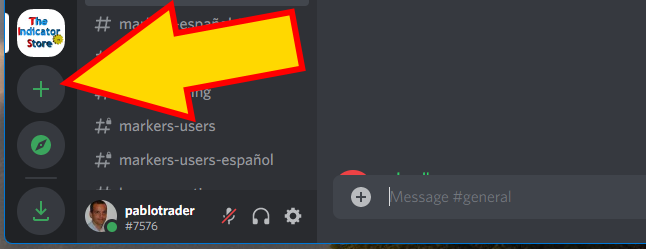
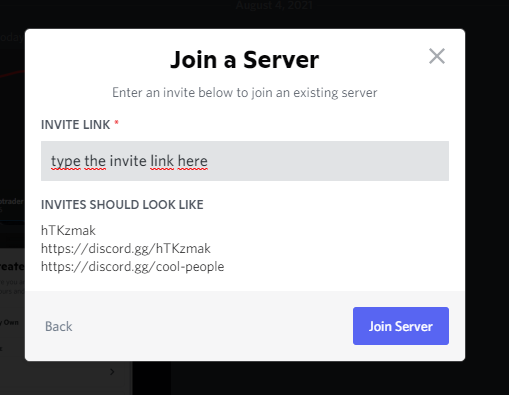
The button at the bottom of this page takes you straight in. If you prefer to do it from inside the Discord app, use the + button in the left sidebar and paste this invite link:
Soporte Técnico y Comunidad de Markers
El lugar donde los usuarios de Markers consiguen respuestas, plantillas y actualizaciones.
🤖 Markers Support: tu asistente 24/7
Nuestro asistente da soporte técnico directamente dentro del chat room, a cualquier hora y en cualquier huso horario.
Qué vas a encontrar adentro
Biblioteca de tutoriales
Videos de entrenamiento y explicaciones compartidas con la comunidad.
Plantillas de estrategias
Ejemplos listos para usar y el conversor de plantillas de Markers.
Actualizaciones
Links de descarga de las últimas versiones y de las betas.
Comunidad global
Traders operando estos sistemas en vivo, más nuestro equipo de desarrollo.
✅ Cómo entrar
- Creá una cuenta de Discord: es gratis, en discord.com, si todavía no tenés una.
- Entrá al servidor: hacé click en el botón de abajo. Los canales públicos están abiertos para todos.
- Habilitá las secciones privadas: #markers-users, #download-links y el bot 24/7 están reservados para clientes con una licencia emitida por The Indicator Store. Una vez que estés en el servidor, mandanos tu usuario de Discord y te habilitamos el acceso.
¿Ya usás Discord? Agregá nuestro servidor
El botón que está al final de esta página te lleva directo. Si preferís hacerlo desde la app de Discord, usá el botón + de la barra lateral izquierda y pegá este link de invitación: