


TIS_EMA_Trader
Original price was: $210.00.$168.00Current price is: $168.00.
Entradas por retroceso a la EMA para NinjaTrader 8: el setup se arma cuando el precio se aleja una distancia fija y se dispara cuando vuelve a tocar la EMA. Señales y nivel de entrada expuestos para Markers.
EMA pullback entries for NinjaTrader 8: the setup arms when price moves a set distance away and triggers when it touches the EMA again. Signals and entry level exposed for Markers.
Description
TIS_EMA_Trader para NinjaTrader 8
Entradas por retroceso a una EMA, solo después de que el precio se alejó una distancia real.
Qué hace
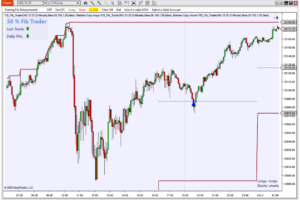
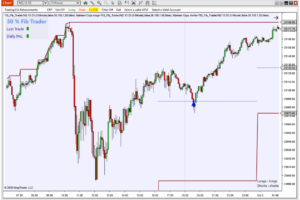
TIS_EMA_Trader dibuja una EMA con una envolvente alrededor. Cuando el precio llega a la envolvente, el setup se arma en esa dirección. Cuando el precio vuelve y toca la EMA, marca la entrada: compra después de un avance por encima de la banda superior, venta después de una caída por debajo de la inferior.
Primero, distancia
El setup solo se arma cuando el precio se aleja EMA_Envelope ticks de la EMA, 25 por defecto. El precio que deambula alrededor de la línea nunca lo arma.
Entrada en el toque
Una vez armado, la señal se da cuando el precio toca la EMA, más un offset opcional en ticks. Se calcula en cada tick, así que la señal aparece en el momento del toque.
Nivel de entrada en el gráfico
Mientras el setup está armado, el plot Entry muestra el precio de entrada: un nivel listo para una orden limitada.
Invert Logic
Invierte la dirección de las señales, para operar la lectura contraria del mismo toque.
Claro en el gráfico
Las velas y el nivel de entrada se colorean según la dirección armada, con flechas y alertas sonoras opcionales.
Listo para automatizar
Las señales de compra y venta y el estado del setup (+1, -1 o 0) se exponen como plots, que se escriben aunque las flechas estén ocultas.
Cómo se forma una señal
1. El precio se aleja
El precio llega a la banda superior o inferior de la envolvente y el setup se arma en esa dirección.
2. El precio vuelve
El precio regresa hacia la EMA. Mientras el setup está armado se muestra el nivel de entrada.
3. El toque dispara
Cuando el precio toca la EMA más el offset, se da la señal y el setup se reinicia.
Parámetros
| Parámetro | Por defecto | Qué hace |
|---|---|---|
| EMA_Period | 34 | Período de la EMA. |
| EMA_Envelope | 25 | Ancho de la envolvente en ticks: la distancia que el precio tiene que recorrer para armar el setup. |
| Offset_Ticks | 0 | Aleja el nivel de entrada de la EMA, en ticks. |
| Round_to_Tick | On | Redondea la EMA al tick del instrumento. |
| Draw_Envelope | On | Muestra u oculta las bandas de la envolvente. |
| Paint_Bars | On | Colorea las velas según la dirección armada. |
| Show Arrows | On | Muestra u oculta las flechas de entrada. Los plots de señal se escriben igual. |
| Invert_Logic | Off | Invierte la dirección de las señales. |
| Enable_Alert / Alert_File | Off | Alerta sonora cuando aparece un nivel de entrada nuevo, con el archivo de sonido que elijas. |
Salidas
| Plot | Contenido |
|---|---|
| Entry | Nivel de entrada mientras el setup está armado. |
| Env_Up / Env_Dn | Bandas superior e inferior de la envolvente. |
| EMA Up | Tiene valor solo en la vela de una señal de compra. |
| EMA Dn | Tiene valor solo en la vela de una señal de venta. |
| EMA Trend | +1 armado en compra, -1 armado en venta, 0 sin setup. |
Automatizalo con Markers
Markers lee las señales de compra y venta y envía las órdenes, con tu target, stop y horario de operación. Markers se vende por separado.
Requisitos
NinjaTrader 8. Si la licencia se activa con el gráfico ya abierto, recargá el gráfico con F5.
TIS_EMA_Trader for NinjaTrader 8
Pullback entries to an EMA, only after price has moved a real distance away from it.
What it does
TIS_EMA_Trader draws an EMA with an envelope around it. When price reaches the envelope, the setup is armed in that direction. When price comes back and touches the EMA, it marks the entry: long after an advance above the upper band, short after a drop below the lower one.
Distance first
The setup only arms when price travels EMA_Envelope ticks away from the EMA, 25 by default. Price drifting around the line never arms it.
Entry on the touch
Once armed, the signal fires when price touches the EMA, plus an optional offset in ticks. It is calculated on each tick, so the signal appears the moment the line is touched.
Entry level on the chart
While the setup is armed, the Entry plot shows the price where the entry would be: a ready-made level for a limit order.
Invert Logic
Flips the direction of the signals, to trade the opposite reading of the same touch.
Clear on the chart
Bars and the entry level are colored by the armed direction, with optional arrows and audio alerts.
Ready for automation
Long and short signals and the setup state (+1, -1 or 0) are exposed as plots, written even when the arrows are hidden.
How a signal forms
1. Price moves away
Price reaches the upper or lower envelope band and the setup is armed in that direction.
2. Price comes back
Price returns toward the EMA. The entry level is shown while the setup is armed.
3. The touch triggers
When price touches the EMA plus the offset, the signal fires and the setup resets.
Parameters
| Parameter | Default | What it does |
|---|---|---|
| EMA_Period | 34 | Period of the EMA. |
| EMA_Envelope | 25 | Envelope width in ticks: the distance price must travel to arm the setup. |
| Offset_Ticks | 0 | Moves the entry level away from the EMA, in ticks. |
| Round_to_Tick | On | Rounds the EMA to the instrument’s tick size. |
| Draw_Envelope | On | Shows or hides the envelope bands. |
| Paint_Bars | On | Colors the bars by the armed direction. |
| Show Arrows | On | Shows or hides the entry arrows. The signal plots are written either way. |
| Invert_Logic | Off | Flips the direction of the signals. |
| Enable_Alert / Alert_File | Off | Audio alert when a new entry level appears, with the sound file of your choice. |
Outputs
| Plot | Content |
|---|---|
| Entry | Entry level while the setup is armed. |
| Env_Up / Env_Dn | Upper and lower envelope bands. |
| EMA Up | Value only on the bar of a long signal. |
| EMA Dn | Value only on the bar of a short signal. |
| EMA Trend | +1 armed long, -1 armed short, 0 no setup. |
Automate it with Markers
Markers reads the long and short signals and sends the orders, with your target, stop and trading hours. Markers is sold separately.
Requirements
NinjaTrader 8. If the license is activated while the chart is already open, reload the chart with F5.
Solo los clientes que hayan comprado este producto pueden dejar una opinión.
Related Products
-
New
-
Popular
-
-


Opiniones
Aún no hay opiniones.