TIS_OpenClose_Plus for TradingView
This indicator is available by subscription only. Subscribe on our TradingView page →Este indicador está disponible solo por suscripción. Suscribite desde nuestra página de TradingView →
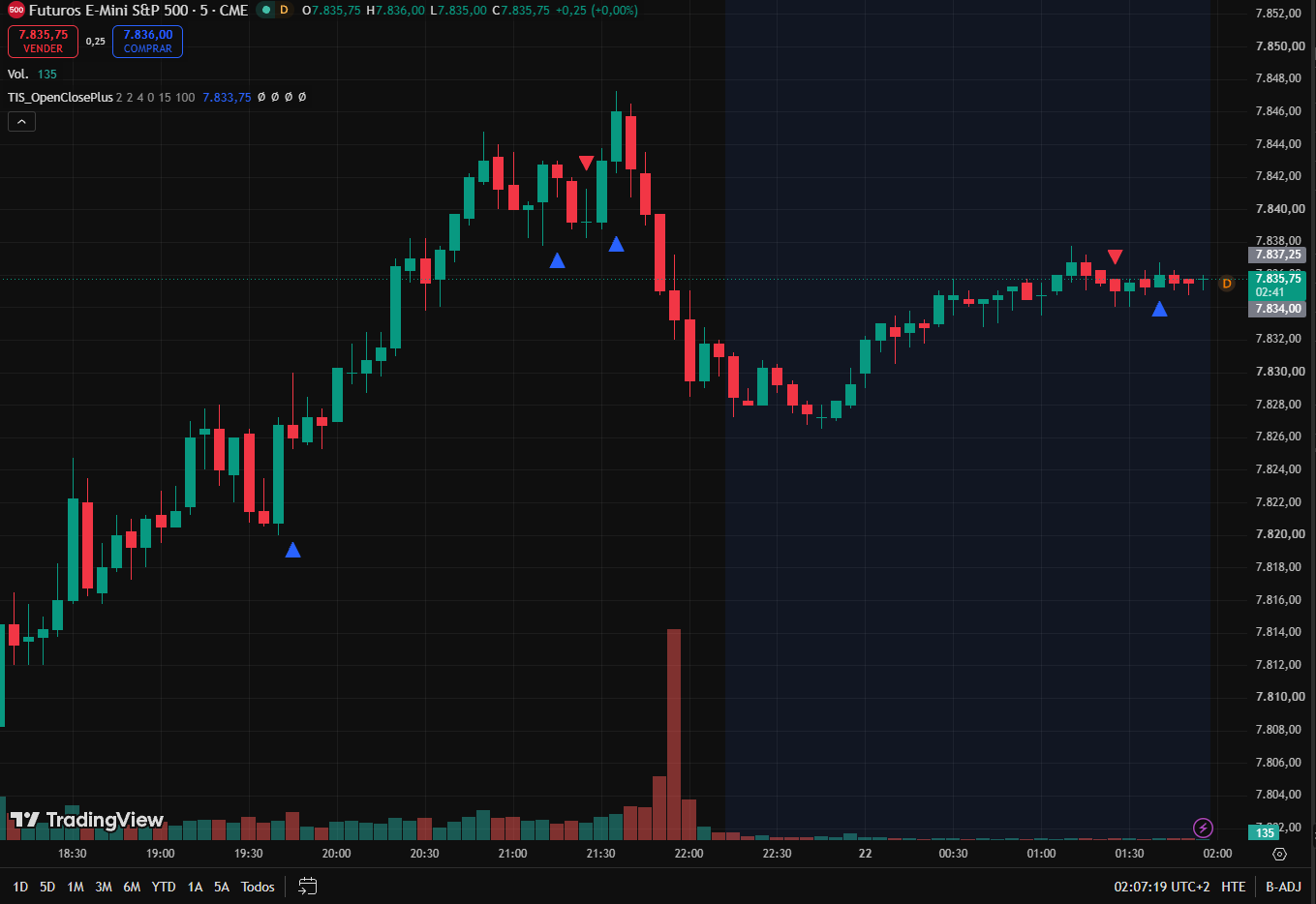
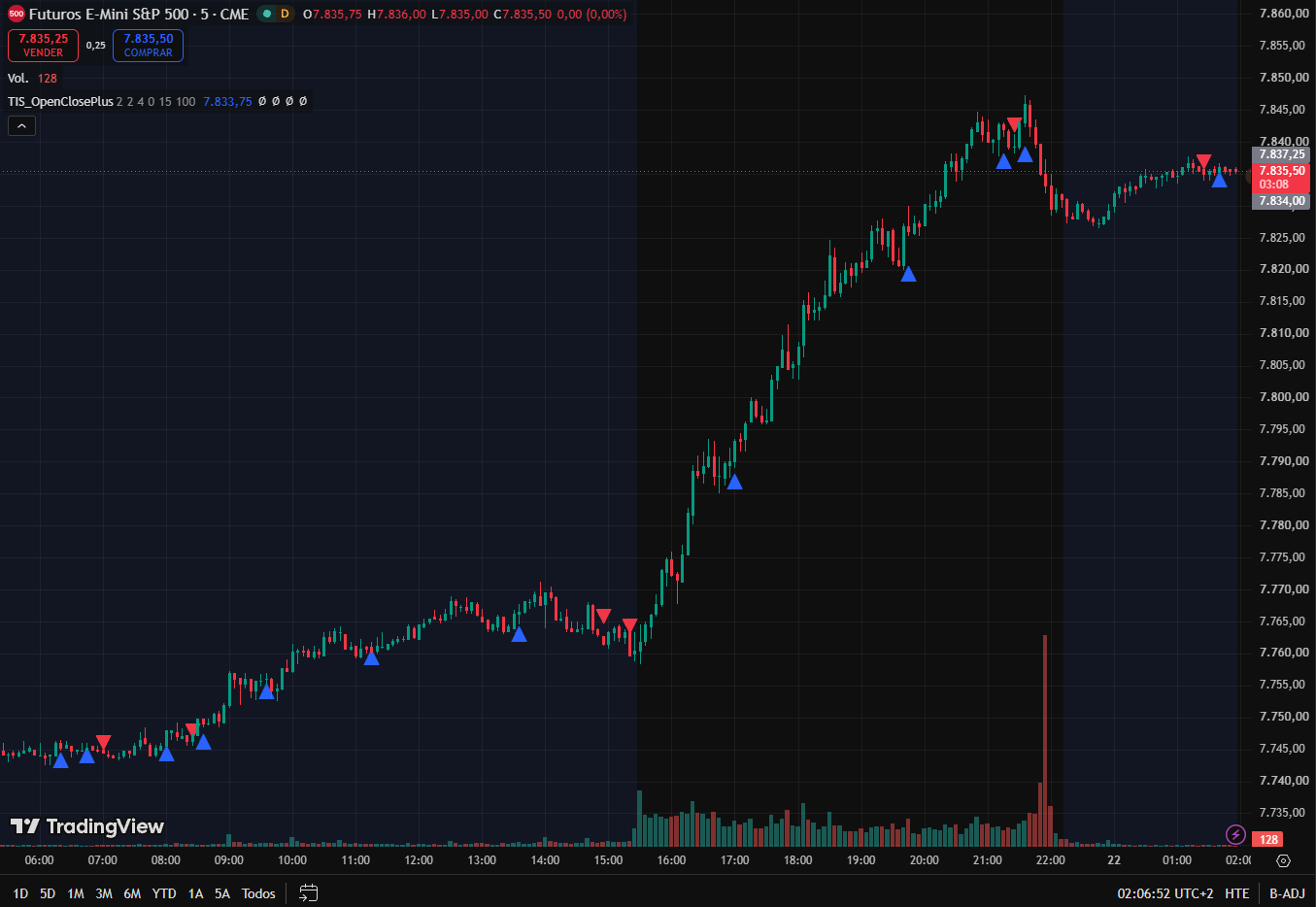
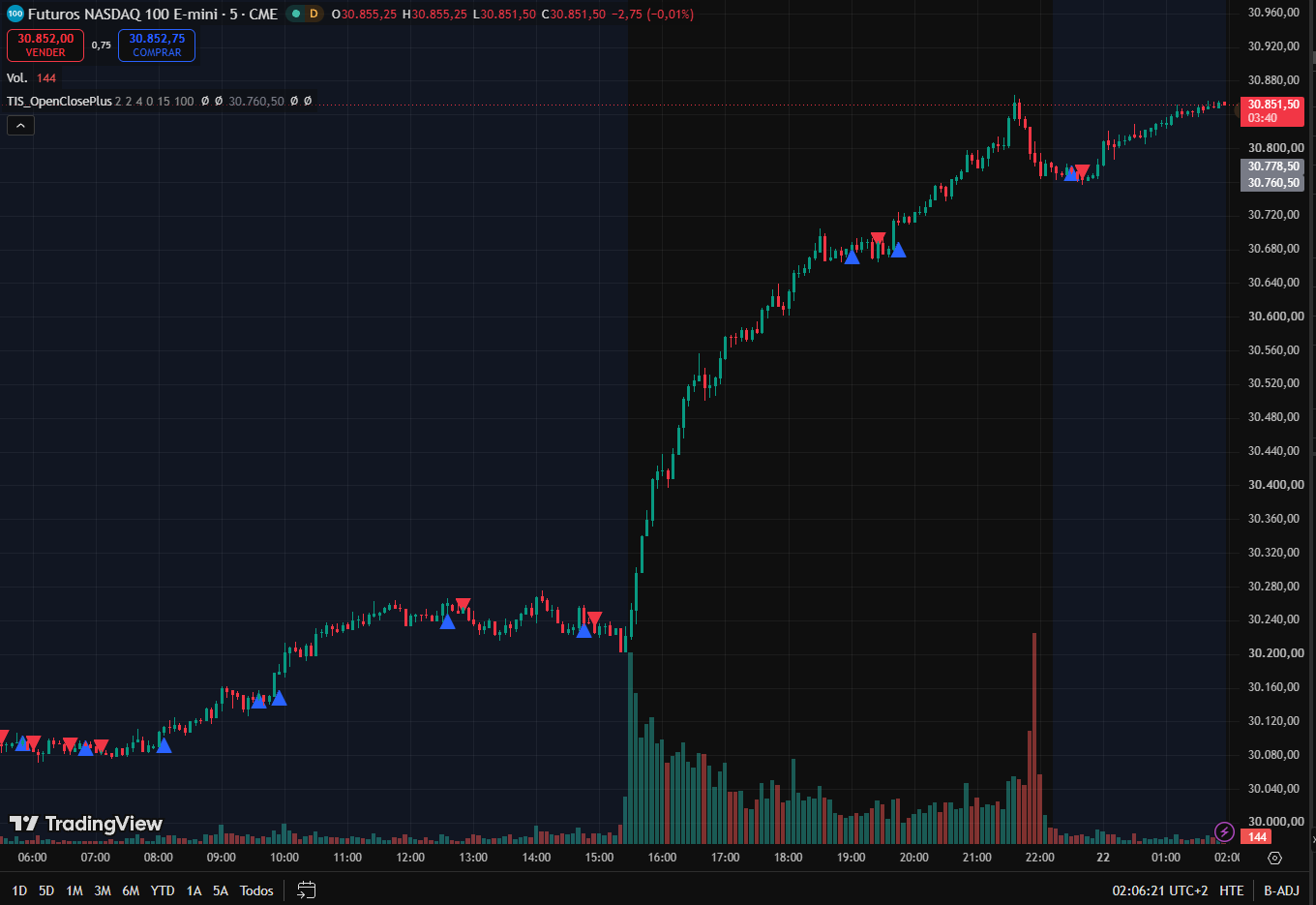
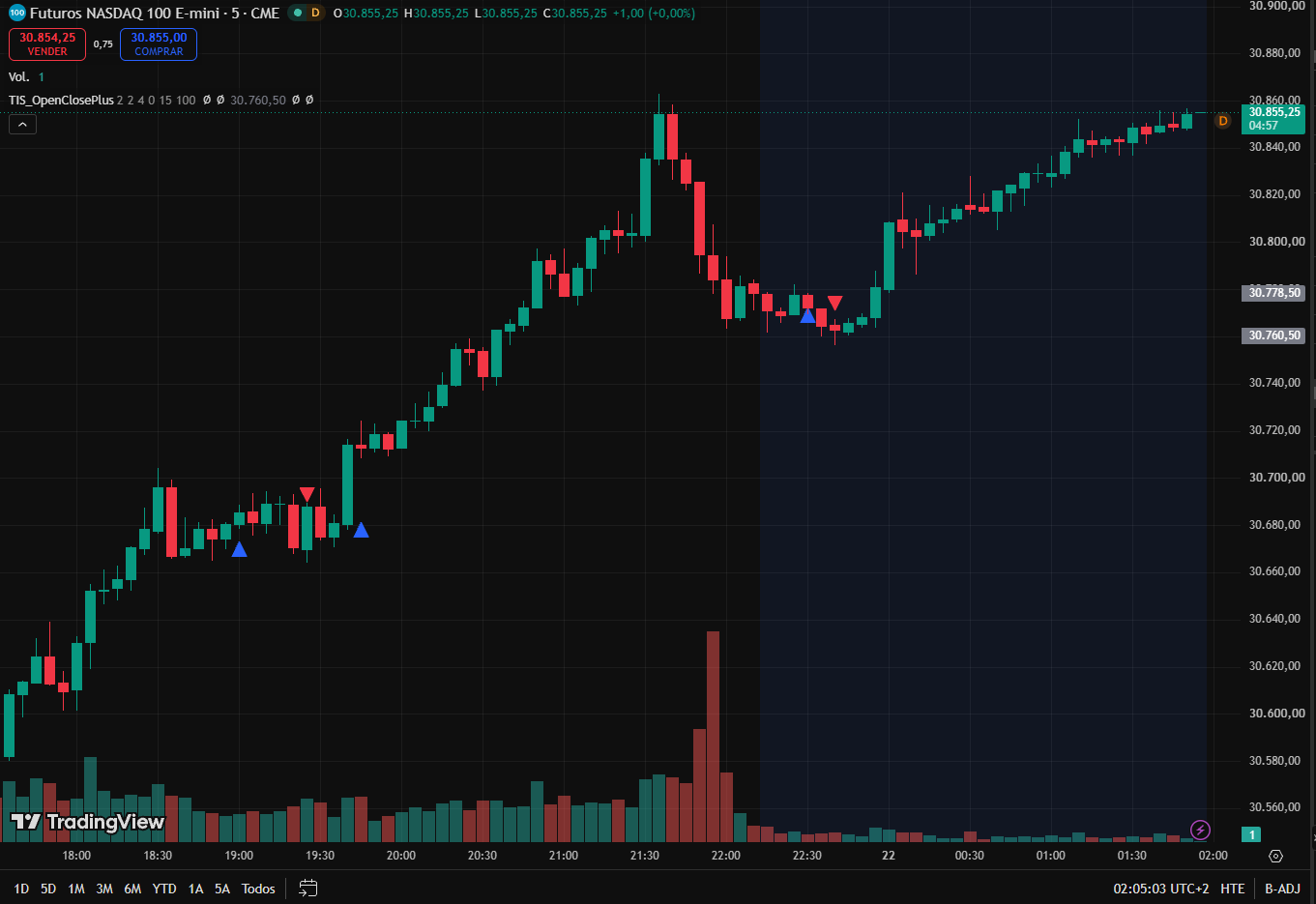
Indicador en Pine Script que señala cuándo se completa una secuencia de presión compradora o vendedora, armada con las condiciones que usted elige: dirección de la barra, máximos, mínimos y cierres más altos durante una cantidad de barras definida. Los filtros PLUS exigen que cada nuevo swing mejore al anterior. Con alertas y compatible con TIS_Automator.
Pine Script indicator that signals when a run of buying or selling pressure completes, built from conditions you choose: bar direction, higher highs, higher lows and higher closes over a set number of bars. PLUS filters require each new swing to improve on the last one. Alert-ready and compatible with TIS_Automator.
Description
TIS_OpenClosePlus para TradingView te deja definir exactamente cómo se ve una secuencia de presión compradora o vendedora, y señala el momento en que esa secuencia se completa. Vos elegís las condiciones, cuántas barras seguidas tienen que cumplirlas, y si cada nuevo swing tiene que mejorar al anterior.
Cómo funciona
Armás tu propia definición de barra alcista combinando cuatro condiciones: la barra cierra por encima de su apertura, marca un máximo más alto, marca un mínimo más alto, y cierra por encima del cierre anterior. Activás las que quieras y dejás el resto apagadas. Dos condiciones extra te permiten exigir mecha superior o inferior en cada barra de la secuencia. Cuando la cantidad de barras consecutivas que definiste cumple todas las condiciones habilitadas, la secuencia se completa y el indicador dispara. El lado bajista se define igual, de forma independiente y con su propio conteo de barras.
Eso por sí solo es un contador de secuencias. Lo que lo convierte en un filtro de estructura es PLUS. Cada secuencia completada deja un pivote: el punto más bajo de una secuencia alcista, el más alto de una bajista. Con PLUS activado, un largo solo señaliza cuando el nuevo pivote bajo queda por encima del anterior, y un corto solo señaliza cuando el nuevo pivote alto queda por debajo del anterior. PLUS 2 aplica la misma prueba al lado opuesto, así podés exigir mínimo más alto y máximo más alto antes de habilitar un largo.
Encima de eso tenés tres capas más de control. El modo Heikin Ashi corre todas las condiciones sobre velas suavizadas en lugar de las originales, lo que recorta bastante ruido en temporalidades rápidas. El filtro de regresión lineal bloquea los largos salvo que su pendiente esté subiendo, y los cortos salvo que esté bajando. Y el par Repeat / Reset decide si un mismo lado puede volver a disparar dentro de un movimiento que ya viene corriendo, o si tiene que esperar a que las velas cambien de color.
Todo se evalúa al cierre de la barra. Una vez que la barra cerró, su señal es definitiva y no cambia.
Características principales
▸ Armás tu propia barra alcista y bajista con cuatro condiciones combinables, más requisitos opcionales de mecha
▸ Longitud de secuencia independiente para el lado largo y el corto
▸ Filtros de pivote PLUS y PLUS 2: cada nuevo swing tiene que mejorar al anterior para habilitar la señal
▸ El modo Heikin Ashi aplica el suavizado a todas las condiciones, no solo a lo que se ve
▸ Filtro de regresión lineal para operar largos solo con pendiente positiva y cortos solo con pendiente negativa
▸ Repeat y Reset controlan si un lado puede disparar más de una vez dentro del mismo movimiento
▸ Pintado opcional del fondo del gráfico con el color de la tendencia, con intensidad ajustable
▸ Estado de tendencia y niveles de pivote expuestos como fuentes seleccionables por otros scripts
▸ Alertas de largo y de corto incorporadas
Parámetros
| Parámetro | Descripción |
|---|---|
| Bar Count (Up) / Bar Count (Down) | Cuántas barras consecutivas deben cumplir todas las condiciones habilitadas para que la secuencia dispare. Se define por separado para cada lado. |
| Bar Up / Bar Down | Cada barra de la secuencia debe cerrar por encima de su apertura, o por debajo en el lado corto. |
| Higher High / Lower High | Cada barra debe marcar un máximo más alto que la anterior, o más bajo en el lado corto. |
| Higher Low / Lower Low | Cada barra debe marcar un mínimo más alto que la anterior, o más bajo en el lado corto. |
| Higher Close / Lower Close | Cada barra debe cerrar por encima del cierre anterior, o por debajo en el lado corto. |
| Repeat Longs / Repeat Shorts | Permite que un lado vuelva a disparar mientras su tendencia ya está activa, en lugar de esperar al lado opuesto. |
| Reset Longs / Reset Shorts | Con Repeat activado, exige que las velas cambien de color antes de habilitar la repetición del mismo lado. |
| Wick on Top (Up) / Wick on Top (Down) | Exige que cada barra de la secuencia deje mecha superior. |
| Wick on Bottom (Up) / Wick on Bottom (Down) | Exige que cada barra de la secuencia deje mecha inferior. |
| Paint Arrows | Agrega una flecha sobre el triángulo de señal, con los colores de largo y corto definidos más abajo. |
| Offset | Ticks entre el extremo de la barra y el marcador de señal. |
| PLUS (Higher Lows) | Largos solo cuando el nuevo pivote bajo queda por encima del anterior, cortos solo cuando el nuevo pivote alto queda por debajo del anterior. |
| PLUS 2 (Higher Highs) | Aplica la misma prueba de pivote al lado opuesto, de modo que los dos swings tengan que coincidir para habilitar la señal. |
| Enable HA Filter | Corre todas las condiciones sobre valores Heikin Ashi en lugar de las velas originales. |
| Bars Expiration | Barras que el estado de tendencia permanece activo tras un disparo. 0 significa que no expira. Solo aplica con PLUS desactivado. |
| Paint Back | Pinta el fondo del gráfico con el color de la tendencia activa. |
| Paint Back Opacity | Intensidad de ese fondo, en escala de 0 a 255. El default de 15 es deliberadamente muy tenue. |
| Long / Short Signal Color | Colores usados en las flechas y en el pintado del fondo. |
| Use Filter ? | Activa el filtro de regresión lineal: largos solo mientras sube, cortos solo mientras baja. |
| Filter Period | Cantidad de barras que usa esa regresión lineal. |
¿Para quién es?
Para el trader que ya sabe describir su entrada en palabras, algo del estilo tres velas Heikin Ashi seguidas cerrando al alza y cada una con un mínimo más alto, y quiere eso escrito en el gráfico en lugar de detectarlo a ojo. Como cada condición es un interruptor aparte, el mismo indicador se puede afinar desde un disparador de momentum bastante suelto hasta uno estructural muy estricto, y después pasarlo a alertas o a un flujo automatizado.
Listo para automatizar. TIS_OpenClosePlus es totalmente compatible con nuestro sistema TIS_Automator: seleccionás las salidas de largo y corto como fuentes de señal, o le pasás la salida única de tendencia, definís target y stop, y las secuencias se operan de punta a punta sin intervención manual.
TIS_OpenClosePlus for TradingView lets you define exactly what a run of buying or selling pressure looks like, and signals the moment that run completes. You choose the conditions, how many bars in a row have to meet them, and whether each new swing has to improve on the last one.
How It Works
You build your own definition of an up bar by combining four conditions: the bar closes above its own open, prints a higher high, prints a higher low, and closes above the previous close. Turn on the ones you want and leave the rest off. Two extra conditions let you demand an upper or a lower wick on every bar of the run. When the number of consecutive bars you set all satisfy every condition you enabled, the run completes and the indicator triggers. The down side is defined the same way, independently, with its own bar count.
That alone is a sequence counter. What turns it into a structure filter is PLUS. Every completed run leaves a pivot behind: the lowest point of a bullish run, the highest point of a bearish one. With PLUS enabled, a long only signals when the new low pivot sits above the previous low pivot, and a short only signals when the new high pivot sits below the previous high pivot. PLUS 2 applies the same test to the opposite side, so you can require both a higher low and a higher high before a long is allowed through.
On top of that you get three more layers of control. The Heikin Ashi mode runs every condition on smoothed candles instead of raw ones, which cuts down the noise on fast timeframes. The linear regression filter blocks longs unless its slope is rising and blocks shorts unless it is falling. And the Repeat and Reset pair decides whether the same direction can fire again inside a move that is already running, or has to wait for the candles to flip color first.
Everything is evaluated on the bar close. Once a bar has closed, its signal is final and never changes.
Key Features
▸ Build your own up bar and down bar from four combinable conditions, plus optional wick requirements
▸ Independent run length for the long side and the short side
▸ PLUS and PLUS 2 pivot filters: each new swing has to improve on the previous one before a signal is allowed
▸ Heikin Ashi mode applies the smoothing to every condition, not just to the display
▸ Linear regression filter to keep longs on a rising slope and shorts on a falling one
▸ Repeat and Reset control whether a side can trigger more than once inside the same move
▸ Optional chart background painted in the trend color, with adjustable strength
▸ Trend state and pivot levels exposed as selectable sources for other scripts
▸ Long and short alert conditions built in
Parameters
| Parameter | Description |
|---|---|
| Bar Count (Up) / Bar Count (Down) | How many consecutive bars must satisfy every enabled condition before the run triggers. Set separately for each side. |
| Bar Up / Bar Down | Each bar of the run must close above its own open, or below it on the short side. |
| Higher High / Lower High | Each bar must print a higher high than the previous one, or a lower high on the short side. |
| Higher Low / Lower Low | Each bar must print a higher low than the previous one, or a lower low on the short side. |
| Higher Close / Lower Close | Each bar must close above the previous close, or below it on the short side. |
| Repeat Longs / Repeat Shorts | Allows a side to trigger again while its trend is already running, instead of waiting for the opposite side first. |
| Reset Longs / Reset Shorts | With Repeat on, requires the candles to flip color before the same side is allowed to repeat. |
| Wick on Top (Up) / Wick on Top (Down) | Requires every bar of the run to leave an upper wick. |
| Wick on Bottom (Up) / Wick on Bottom (Down) | Requires every bar of the run to leave a lower wick. |
| Paint Arrows | Adds an arrow on top of the signal triangle, drawn in the long and short colors below. |
| Offset | Ticks between the bar extreme and the signal marker. |
| PLUS (Higher Lows) | Longs only when the new low pivot is above the previous one, shorts only when the new high pivot is below the previous one. |
| PLUS 2 (Higher Highs) | Applies the same pivot test to the opposite side, so both swings have to agree before a signal is allowed. |
| Enable HA Filter | Runs every condition on Heikin Ashi values instead of raw candles. |
| Bars Expiration | Bars the trend state stays active after a trigger. 0 means it never expires. Applies only when PLUS is off. |
| Paint Back | Paints the chart background in the color of the active trend. |
| Paint Back Opacity | Strength of that background, on a 0 to 255 scale. The default of 15 is deliberately very light. |
| Long / Short Signal Color | Colors used for the arrows and for the background painting. |
| Use Filter ? | Turns on the linear regression filter: longs only while it rises, shorts only while it falls. |
| Filter Period | Number of bars used by that linear regression. |
Who Is It For?
Traders who already know what their entry looks like in plain words, something like three consecutive Heikin Ashi bars closing up with a higher low each time, and want that written into the chart instead of spotted by eye. Because every condition is a separate switch, the same indicator can be tuned from a loose momentum trigger to a very strict structural one, and then handed to alerts or to an automated workflow.
Automation ready. TIS_OpenClosePlus is fully compatible with our TIS_Automator system: select the long and short outputs as signal sources, or feed it the single trend output, set your target and stop, and the sequences can be traded end to end without manual intervention.
Solo los clientes que hayan comprado este producto pueden dejar una opinión.
Related Products
-
-
-
-
Popular
Opiniones
Aún no hay opiniones.